User Account Hider
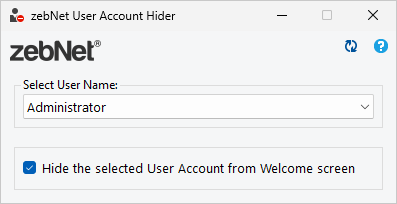
zebNet User Account Hider easily allows you to hide user accounts from the Windows welcome screen.
It is straightforward to hide a user from the Windows welcome screen by using zebNet User Account Hider. Simply select the user you wish from the dropdown list and choose if the user should be displayed on the welcome screen or not.
With zebNet User Account Hider you no longer need to manually change values in the Windows Registry to hide a user from the welcome screen. Now you can do that with just two clicks.
Supported operating systems
- Windows 7
- Windows 8
- Windows 8.1
- Windows 10
- Windows 11
Additional Software Requirements
- Microsoft .NET Framework 4.6.2
Note: Any additional software requirement is available completely for free and will automatically be installed during the installation of the application if it's not already present on your computer.
Denna nedladdning omfattas av vår säkerhetsgaranti
Denna nedladdning är 100 % säker: Ingen spionprogramvara, ingen reklamprogramvara, ingen skadlig programvara av något slag! Garanterat av oss och certifierat av tredje part. Din integritet och ditt skydd är vår högsta prioritet! (Läs mer)